

EditTextImage
EditTextImage lets you replace text in any image online instantly, keeping fonts, colors, and perspective intact without design skills.
About EditTextImage
EditTextImage is a groundbreaking AI-powered online tool that has emerged as the fastest and most intuitive solution for editing text within images. In an era where visual content dominates marketing, communication, and documentation, the ability to modify text in a finished image without the original design file has been a persistent pain point. EditTextImage directly addresses this by allowing users to upload any image, specify the existing text and its replacement, and let advanced AI sample the typography directly from the pixels. This means the font, color, size, drop shadow, perspective, and background are all preserved with pixel-perfect accuracy, eliminating the need for expensive software like Photoshop or recurring subscriptions to design platforms. The tool is designed for a broad audience: marketers needing to A/B test headlines on ad creatives, product managers updating labels and packaging shots, localization teams swapping languages on app screenshots, and anyone who has ever faced the frustration of a single typo on a finished poster or document. With an average processing time of approximately 12 seconds and output at 2K resolution, EditTextImage is not just a convenience; it is a paradigm shift in how we handle image editing. It democratizes design, making professional-grade text replacement accessible to anyone with a browser and an image, all while adhering to strict ethical guidelines to prevent misuse. The value proposition is clear: no Photoshop skills, no font files to install, no recurring fees, just a one-time credit purchase for high-quality, rapid text edits.
Features of EditTextImage
Pixel-Perfect Typography Sampling
The core technology behind EditTextImage is its AI that samples the typeface directly from the image pixels. Unlike traditional editors that require you to know the exact font name or have it installed, this tool analyzes the visual characteristics of the existing text, including serifs, weight, spacing, and even stylistic flourishes. It then applies the replacement text using the same sampled typography, ensuring that the new text blends seamlessly with the original design. This feature is revolutionary for working with paid fonts, custom hand-lettering, or unique typefaces that are not available in standard libraries.
Automatic Style and Effect Preservation
When you edit text in an image, it is not just the font that matters; the visual effects applied to the text are equally critical. EditTextImage automatically detects and replicates drop shadows, glows, gradients, outlines, and perspective distortions. Whether the original text has a subtle shadow on a product label or a 3D perspective on a building sign, the AI ensures the replacement text inherits these exact properties. This eliminates the tedious manual adjustments required in other tools, delivering a truly seamless result in seconds.
High-Resolution 2K Output
Quality is non-negotiable in professional visual work. EditTextImage outputs all edited images at a crisp 2K resolution, ensuring that the final result is suitable for high-resolution displays, print materials, and professional presentations. This feature sets it apart from many free or low-cost tools that compress or downscale the output. Users can confidently use the edited images for social media ads, e-commerce product photos, or even large-format posters without worrying about pixelation or loss of detail.
Rapid 10-Second Processing
Speed is a defining feature of EditTextImage. The entire process from upload to download averages around 10 to 12 seconds. This is a game-changer for fast-paced workflows where time is critical, such as correcting a typo in a time-sensitive social media post or updating a pricing label for a flash sale. The tool eliminates the bottleneck of waiting for a designer or struggling with complex software, empowering non-designers to make instant changes and keep projects moving forward.
Use Cases of EditTextImage
Fixing Typos and Errors in Documents
One of the most common and frustrating scenarios is discovering a typo in a finalized contract, invoice, or report that only exists as a PDF or scanned image. EditTextImage provides a lifeline by allowing users to directly edit the text in the document image. You can correct a misspelled client name, update an invoice number, or fix a date error without having to recreate the entire document from scratch. This is invaluable for administrative professionals, legal teams, and anyone who works with finalized paperwork.
A/B Testing Headlines for Ad Creatives
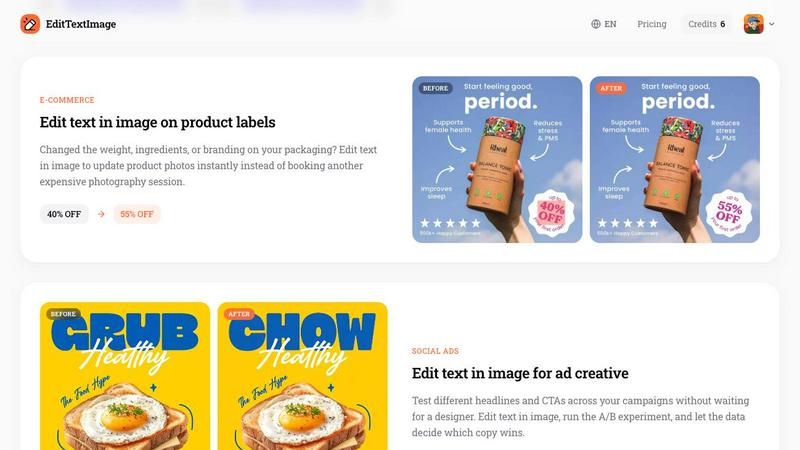
Marketers and growth hackers can use EditTextImage to rapidly iterate on ad creative without waiting for a designer. By editing the text in a finished social media ad or banner image, you can test different headlines, calls to action, or value propositions in a live campaign. The ability to swap copy in seconds allows for data-driven optimization, where you can run A/B experiments to see which version of the text drives the highest click-through rate or conversion, all while keeping the visual design intact.
Localizing App Screenshots for Global Markets
App developers and product managers face the challenge of creating screenshots for app stores in multiple languages. Instead of recreating each UI mockup from scratch for every language, EditTextImage streamlines the process. You can take a single English screenshot and swap the text to French, Spanish, German, or any other language. The AI preserves the exact UI layout, button styles, and font characteristics, delivering pixel-perfect localized screenshots that look native and professional, significantly accelerating the time to market for global app launches.
Updating Product Labels and Packaging Photos
E-commerce businesses frequently need to update product photos due to changes in pricing, weight, ingredients, or branding. Instead of booking a costly new photography session or complex Photoshop work, EditTextImage offers a rapid alternative. You can take an existing product photo and directly edit the text on the label, such as changing a "40% OFF" badge to "55% OFF" or updating an ingredient list. This allows for instant visual updates across an entire product catalog, saving significant time and money while maintaining visual consistency.
Frequently Asked Questions
Is there a free trial available?
Yes, EditTextImage offers a very generous free trial. Every new user receives 1 free credit to edit an image without needing to provide a credit card. You can simply sign in with your Google account and test the tool on your own image to experience the speed and quality of the AI text replacement before making any purchase.
What file formats and sizes are supported?
The tool supports the most common image formats: PNG, JPEG, and WebP. For optimal performance and quality, the maximum file size for upload is 10 MB. This covers the vast majority of screenshots, product photos, posters, and document scans that users typically need to edit. The output is delivered as a high-resolution 2K image.
How does the AI handle complex backgrounds and perspectives?
The AI is specifically trained to handle a wide range of complexities. It can effectively edit text on curved surfaces, such as product labels on bottles, and text that is skewed or has a 3D perspective, like text on a building or a road sign. The technology analyzes the surrounding pixels to reconstruct the background behind the original text and seamlessly blend in the new text with the correct perspective and lighting.
What are the acceptable use policies for this tool?
EditTextImage has strict ethical guidelines to prevent misuse. Users must confirm they own or are licensed to edit the image. The tool explicitly prohibits processing IDs, passports, visa documents, official seals, bank statements, or tampered receipts. Edits intended to deceive a third party, such as falsifying transaction proofs or altering email timestamps, are forbidden. Violations result in account termination, and logs may be shared with law enforcement.
Pricing of EditTextImage
EditTextImage operates on a simple, no-subscription pricing model. After using your one free credit, you can purchase a pack of 30 credits for a one-time fee of $9.90. This is a pay-as-you-go system with no recurring charges. The credits never expire, so you can use them at your own pace. Commercial use of the edited images is included in the price, making it a cost-effective solution for both individual users and businesses. The pricing is designed to be a fraction of the cost of a Photoshop subscription or hiring a designer for simple text edits.
Similar to EditTextImage

Ideogram Studio
Create text-perfect logos, posters, ads, packaging, and ecommerce visuals with Ideogram 4 AI workflows.

Qwen Image Edit
Edit and generate visuals with Qwen Image Edit using prompts for background changes, text edits, posters, outpainting, and style exploration.

MetaMuse
Create AI videos from prompts and references, then generate and edit campaign-ready visuals with MetaMuse image and video tools.


AIEnhancer
Enhance photos, create AI images, and generate videos with flexible workflows, creative effects, and a shared asset library.

Lockimate - AI Live Wallpapers
Turn any photo into a real Apple Live Photo that animates when you wake your iPhone. Restyle it and choose the motion — customizable.

Vismuse
Create polished AI images and videos from prompts or references for social posts, ads, flyers, album covers, and campaigns.

Magic Eraser
AI-powered photo editor for removing objects, erasing backgrounds, enhancing images, and creating visuals.