

ExodeUI
ExodeUI is a multi-agent system that turns motion, interaction, and logic into production-ready React code effortlessly.
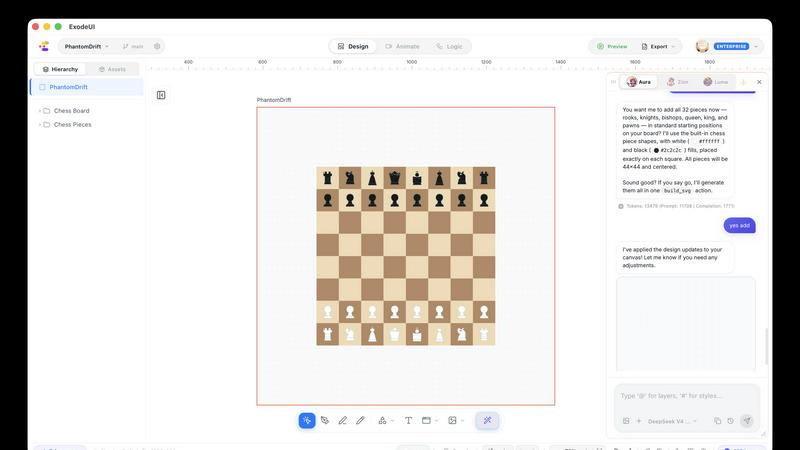
About ExodeUI
ExodeUI is a revolutionary new tool that obliterates the traditional handoff gap between design and engineering. It is the first platform that allows you to design not just the visual pixels of an interface, but the underlying logic, state machines, and physics that make it feel alive. Built for product teams, motion designers, animators, and developers, ExodeUI provides a unified visual language where everyone can collaborate in real-time. The core value proposition is simple: you build a living, breathing interface that drops seamlessly into your codebase as a fully functional runtime, without any manual translation or re-coding. It is the ultimate execution engine for high-fidelity UI, turning static pixels into production-ready code that runs at a buttery-smooth 120fps. By leveraging a multi-agent pipeline with agents like Aura (design), Zion (motion), and Luma (logic), ExodeUI automates the generation of UI, native animation, and React state logic. This is not just a design tool; it is a new category of software that makes motion, interaction, and logic feel as natural as placing a component. It is the answer for teams looking to build interfaces that are not just beautiful, but deeply interactive and physically responsive, bridging the gap between creative vision and technical execution.
Features of ExodeUI
Agent Pipeline (Aura, Zion, Luma)
ExodeUI introduces a groundbreaking multi-agent system that acts as your personal design and development team. Aura is the Design Agent that generates static, clean layouts based on your design system. Zion is the Motion Agent that natively animates every element with physics-driven motion. Luma is the Logic Agent that automatically wires the exact React state logic required for the interface to function. This pipeline streamlines the entire workflow from concept to code, handling the heavy lifting of UI generation, animation, and state management so you can focus on the creative vision.
Fluid Physics and Interactive States
This feature allows you to imbue your interfaces with realistic, physical properties that respond to user input. ExodeUI supports a range of physics-based interactions, including fluid gooey effects that merge on hover, kinetic 3D tilting with preserve-3d transforms, gyroscopic rings that spin on hover, audio wave orchestrations, and elastic drag with spring tension. It also includes micro-switches with state.active toggles. This goes beyond simple CSS transitions, giving you a toolkit to create interfaces that feel tangible and alive, reacting to drag, hover, click, and scroll with natural, physical responses.
Unified Visual Composition Language
ExodeUI creates a single source of truth that every team member can understand and contribute to. Motion designers can work with cubic bezier curves and physics easing, animators can fine-tune spring stiffness and damping, product teams can see the unified vision, and developers can inspect the exact state logic in a format like STATE.EXO. This shared language eliminates the friction of translating designs into code. What you see in the visual composer is exactly what the developer gets, complete with live state and logic, turning the design file into a compiled .exo file ready for production.
Focus Mode and Live Runtime
ExodeUI features a Focus Mode that allows you to concentrate on specific elements or interactions without distraction. More importantly, the output is not a static file but a live runtime. When you drop the design into your codebase, it runs as a fully functional, interactive component. This means there is no handoff, no guesswork, and no re-implementation. The interface you design is the interface that runs in production, maintaining its motion, interaction, and logic perfectly. This live runtime capability ensures that the final product matches the designer's intent exactly, down to the last frame and state transition.
Use Cases of ExodeUI
High-Fidelity Prototyping for Product Teams
Product teams can use ExodeUI to create prototypes that are indistinguishable from the final product. Instead of building static mockups in a design tool and then hoping the engineering team can recreate the feel, teams can design the exact motion, interaction, and logic within ExodeUI. This allows for realistic user testing and stakeholder demos with fully functional interfaces. The prototype is not a throwaway file; it is the first version of the production code, dramatically shortening the time from idea to validated user experience.
Production-Ready UI Component Development
Developers can leverage ExodeUI to build complex, interactive UI components that would be tedious and time-consuming to code from scratch. Whether it is a custom toggle switch with specific spring physics, a kinetic 3D card, or a complex audio visualizer, ExodeUI generates the exact React state logic and animation code. This allows developers to focus on the application's business logic and architecture, while ExodeUI handles the high-fidelity visual and interactive layer, ensuring components are performant and consistent with the design system.
Motion Design and Animation for Marketing Sites
Motion designers and animators can use ExodeUI to create stunning, interactive web experiences for marketing landing pages and brand showcases. The tool's physics engine allows for the creation of fluid, eye-catching animations that engage users, such as liquid gooey menus, gyroscopic hover effects, and elastic drag interactions. These animations are not just visual flair; they are core to the user experience, making the brand feel more dynamic and modern. The output is a clean, performant web component that can be easily embedded.
Collaborative Workflow for Design-Engineering Handoff
ExodeUI serves as the ultimate bridge between design and engineering teams, eliminating the infamous handoff bottleneck. Designers work in a visual environment that expresses motion and logic, while developers see the exact same elements as a compiled, live runtime with state. This shared context prevents miscommunication and rework. The entire team can collaborate in real-time on a single file, with everyone speaking the same language of "cubic_bezier," "spring tension," and "state.active," ensuring the final product is a true reflection of the collective vision.
Frequently Asked Questions
How does ExodeUI differ from traditional design tools like Figma or Sketch?
Traditional design tools are primarily for creating static pixel layouts. ExodeUI goes far beyond that by allowing you to design the motion, interaction, and logic of your interface. It is a tool for creating living, breathing interfaces. While Figma outputs a design spec that needs to be coded, ExodeUI outputs a fully functional runtime that drops directly into your codebase. It is a complete shift from a design handoff tool to a design-and-execution engine.
What is the Agent Pipeline and how does it work?
The Agent Pipeline is a multi-agent system consisting of three specialized AI agents: Aura (Design Agent), Zion (Motion Agent), and Luma (Logic Agent). When you give a prompt like "generate a modern music player card," Aura first creates the static layout. Zion then applies native motion and physics to the elements. Finally, Luma wires the exact React state logic needed for the component to function. The agents work sequentially and seamlessly to automate the entire process from design to code.
Is ExodeUI suitable for developers who are not designers?
Absolutely. ExodeUI is built for developers who want to create high-fidelity, interactive UIs without spending weeks on animation and state logic. The visual composer allows you to see the physics and interactions in real-time, while the output is clean, production-ready React code. It removes the guesswork from implementing complex animations and provides a shared language for developers and designers to collaborate more effectively.
Can I use ExodeUI for production-grade applications?
Yes, ExodeUI is proven in production environments, as indicated by its use by companies like Peerlist and others in the ecosystem. The tool is designed to output compiled .exo files that are optimized for performance, running at 120fps. It is built to handle the demands of real-world applications, from complex state management to physics-driven interactions, making it a reliable engine for shipping high-fidelity UI to users.
Similar to ExodeUI

Budgetpixel AI
Create AI images, videos, music, and designs in one workspace with multiple models, powerful editing tools, and API access.

CADCraft
Free, open-source 2D CAD in Rust for precise drafting, DWG/DXF workflows, and AI-assisted automation via MCP, JSON, and CLI.

ogimagegenerator.dev
Paste a URL and AI designs on-brand Open Graph images from your page's colours, fonts and logo. Free, no sign-up.

Screen Issues
Free Online Screen Test Tool - Instantly diagnose dead pixels, lines, color issues, and flickering. Multiple test modes, no download needed.

HookAds
Free ad creative hub: 1,750+ prompts behind viral AI ads, 118 hook frameworks, teardowns, swipe files and 27 free AI ad tools. Copy, remix, ship.

EditTextPhoto
AI-powered image text editor to edit, replace, fix, or translate text in images while preserving the original font, color, size, and style.

ImageGenerator
Create and edit AI images online with multiple models, text-to-image, image-to-image, background removal, and upscaling.

Image to Layers AI
Turn any image into editable transparent PNG/PSD layers with AI