

Looktara
Looktara is your personal AI photographer creating professional photos from your images in minutes.
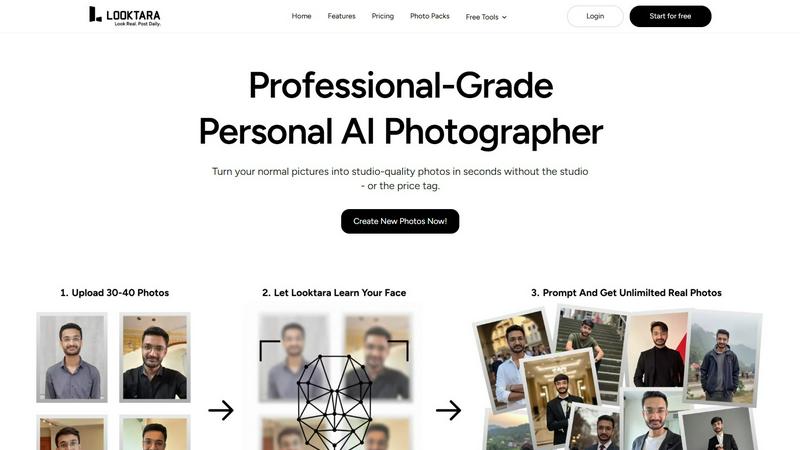
About Looktara
Forget everything you know about AI photo generators. The era of generic, plastic-looking avatars is over. Looktara is the groundbreaking personal AI photographer that's setting a new standard for digital identity. It's not just another filter app; it's a private, encrypted studio that learns you. By analyzing a small set of your photos, Looktara builds an isolated AI model that understands your unique features, expressions, and style. This isn't about creating a fantasy version of you—it's about generating authentic, professional-grade photos that are unmistakably real. Need a sharp headshot for LinkedIn in 5 seconds? A candid, engaging shot for Instagram? Looktara delivers with stunning versatility, giving you complete creative control over the tone, setting, and message. Designed for professionals, creators, and anyone serious about their online presence, Looktara eliminates the cost, scheduling nightmares, and awkwardness of traditional photoshoots. Your personal photographer is now on-demand, creating over 18 million photos for a global community and redefining authenticity in the age of AI.
Features of Looktara
Your Private, Encrypted AI Model
Looktara's core technology is a game-changer. Unlike public AI models, it creates a unique, isolated model just for you from about 30 uploaded photos. This model is encrypted and stored privately, ensuring your biometric data is secure and never used for training other systems. It learns your genuine facial structure, skin texture, and personal style in about 10 minutes, forming the foundation for all your future photos. This private approach guarantees that every generated image is a true reflection of you, not a generic composite.
Authentic Expression & Natural Detail
Looktara is engineered to solve the "uncanny valley" problem plaguing other AI tools. It captures natural expressions, subtle body language, and realistic details that others miss. Say goodbye to over-smoothed, plastic-like skin and awkward, stiff poses. The AI is fine-tuned to replicate your authentic smile, gaze, and posture, resulting in photos that resonate with genuine humanity and professionalism, making you look approachable and confident.
Context-Based Styling for Any Platform
One size does not fit all in the digital world. Looktara provides unparalleled control, allowing you to tailor images for specific platforms and vibes. Need a formal, trustworthy headshot for LinkedIn? A creative and relaxed shot for Instagram? A friendly profile for a dating app? You guide the AI with your prompts, ensuring the styling, attire, and background perfectly match your industry, personal brand, and the platform's audience, giving you consistent confidence everywhere.
Integrated Free Editing Toolkit
Beyond generation, Looktara acts as your all-in-one visual content suite. It includes a powerful set of free tools like background removal, face blurring, image cropping, resizing, compression, and format conversion. This means you can instantly edit your AI-generated photos or any other images for polish and consistency without ever leaving the ecosystem, streamlining your entire workflow from creation to publication.
Use Cases of Looktara
Elevating Your Professional Brand on LinkedIn
Consistently refresh your LinkedIn profile with a library of high-quality, professional headshots. Looktara allows you to generate photos in various professional attire and settings (office, conference, studio) that maintain a cohesive and credible brand image. Never use a stale or low-quality photo again, and always have the perfect shot for article features, company updates, or connection requests.
Crafting a Cohesive Instagram Aesthetic
For influencers, creators, and small business owners, maintaining a visually appealing feed is crucial. Looktara enables you to generate a series of authentic, on-brand solo photos in consistent styles or themes. Whether you need content for a product launch, a personal story, or a themed series, you can produce beautiful, genuine images that enhance your feed's aesthetic without the cost of multiple photoshoots.
Creating Perfect Dating Profile Photos
Navigate the world of online dating with authentic and flattering photos. Looktara helps you generate natural, friendly, and approachable images that truly represent you in various social settings—casual coffee shop, hobby activity, or a nice outdoor scene. Avoid the pitfalls of group crops, old photos, or awkward selfies by having a selection of great solo shots that show your best self.
Rapid Personal Branding for Entrepreneurs
Startups and solo entrepreneurs can build a strong visual identity from day one. Use Looktara to quickly generate a suite of professional photos for your website "About" page, speaker bios, podcast artwork, and marketing materials. This ensures you present a polished, trustworthy, and consistent image across all touchpoints, essential for establishing credibility and attracting clients or investors.
Frequently Asked Questions
How many photos do I need to upload to get started?
You only need to upload around 30 photos of yourself to train your personal AI model. The key is variety: include photos with different angles, lighting conditions, expressions (smiling, serious), and backgrounds. This diversity helps the AI learn a comprehensive and accurate representation of your unique features, ensuring the highest quality output for your generated photos.
Is my data and photo privacy protected?
Absolutely. Privacy and security are foundational to Looktara. Your uploaded photos are used to create a private, encrypted AI model that is isolated to your account only. This model is not used to train any general AI systems, and your data is not shared with third parties. You maintain complete ownership and control over your personal AI model and all the images it generates.
How long does it take to generate new photos?
Once your personal AI model is trained (which takes about 10 minutes), generating a new, high-quality photo is incredibly fast. You can expect to receive your final image in approximately 5 seconds after submitting your generation request. This allows for rapid iteration and experimentation with different styles, prompts, and settings on the fly.
Can I control the style and setting of the generated photos?
Yes, you have full creative control. Looktara is designed for context-based styling. You guide the AI using text prompts to specify the desired vibe, setting (e.g., "modern office," "cozy cafe"), attire ("professional suit," "casual sweater"), and even expression. This ensures the output aligns perfectly with your vision and the specific platform or purpose you have in mind.
Explore more in this category:
Similar to Looktara

AIEnhancer
Enhance photos, create AI images, and generate videos with flexible workflows, creative effects, and a shared asset library.

Lockimate - AI Live Wallpapers
Turn any photo into a real Apple Live Photo that animates when you wake your iPhone. Restyle it and choose the motion — customizable.

Vismuse
Create polished AI images and videos from prompts or references for social posts, ads, flyers, album covers, and campaigns.

Magic Eraser
AI-powered photo editor for removing objects, erasing backgrounds, enhancing images, and creating visuals.

Free Gemini Omni
Create, remix, and edit cinematic AI videos from text, images, audio, and video prompts.

UGCad AI
AI UGC video ad Generator which Turn a URL, prompt, or template into a ready video ads

HubVanta AI
HubVanta AI helps creators generate images and videos with advanced AI tools for visual content workflows.

StopScroll
AI YouTube thumbnail maker that helps creators generate high-click thumbnails faster.