
securememo.app vs Zovo
Side-by-side comparison to help you choose the right tool.
securememo.app
Securememo.app offers encrypted notes without accounts or tracking, ensuring your privacy is always protected.

Unlock 20 privacy-first Chrome extensions for developers and writers, all from a solo developer committed to your data.
Last updated: February 28, 2026
Visual Comparison
securememo.app
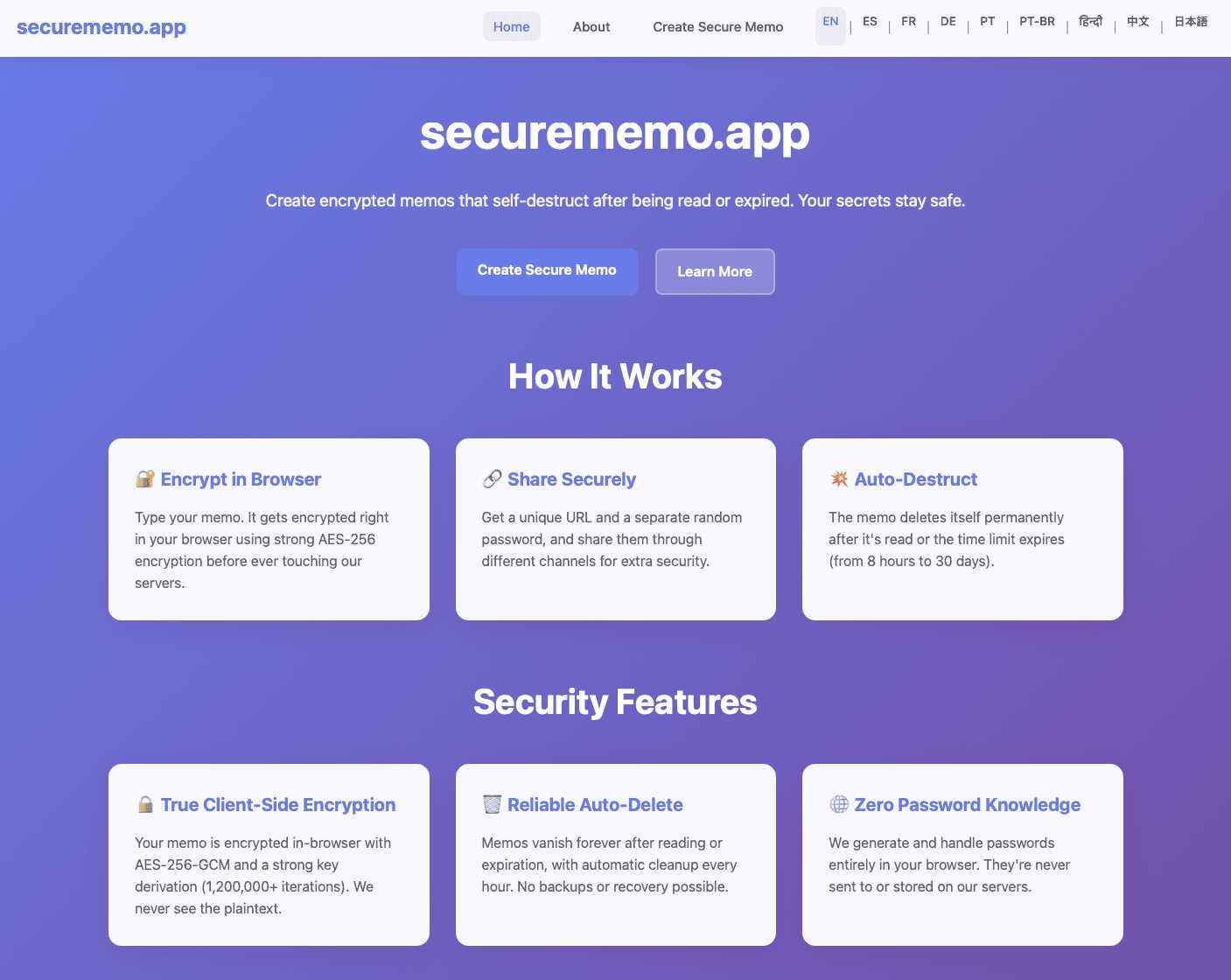
Zovo

Feature Comparison
securememo.app
Client-Side Encryption
Securememo.app utilizes robust client-side encryption that ensures your notes are encrypted on your device before being transmitted. This means that no one—neither the service providers nor potential hackers—can access your sensitive information.
Self-Destructing Notes
One of the standout features of Securememo.app is its self-destructing notes. Users can set a timer for their memos to automatically delete after a specified period, adding an extra layer of security and peace of mind for those sharing sensitive information.
Unique Link Sharing
Sharing notes is seamless with Securememo.app’s unique link sharing feature. Once you create a memo, a distinct link is generated, allowing you to easily share your note with anyone while maintaining control over access.
Password Protection
Each memo can be secured with a strong, randomly generated password that is created solely on your device. This ensures that even if someone obtains the link to your memo, they cannot access it without the password, which you can share through a separate channel.
Zovo
Privacy-First Design
Every Zovo extension is built with user privacy in mind. Running entirely on your device, these tools ensure that no data leaves your browser, eliminating risks associated with data breaches and tracking. Say goodbye to invasive ads and unwanted data collection.
Community-Driven Development
Zovo thrives on user feedback, allowing members to vote on new features and tools to be developed. This unique approach not only fosters community engagement but also ensures that the most requested features are prioritized, aligning the product with real user needs.
Comprehensive Tool Suite
With 20 extensions available, Zovo provides a one-stop solution for various browser needs. From managing tabs to formatting JSON and maintaining clipboard history, each tool is designed to enhance productivity and streamline workflows without compromising on privacy.
Seamless Installation and Use
Zovo extensions can be installed in seconds without creating an account. Core features are available for free, allowing users to experience the power of the extensions immediately. Upgrading to Pro unlocks additional features when users are ready for more.
Use Cases
securememo.app
Secure Personal Notes
Individuals can use Securememo.app to jot down personal notes, reminders, or thoughts without the worry of unauthorized access. The service's secure environment ensures that private information remains confidential.
Professional Collaboration
In professional settings, teams can use Securememo.app to share confidential project notes, brainstorming ideas, or sensitive information with colleagues. The self-destructing feature ensures that sensitive data is not lingering indefinitely.
Educational Purposes
Students can utilize Securememo.app for creating and sharing study notes or collaborative projects with classmates while ensuring that their academic work remains private and secure from prying eyes.
Temporary Information Sharing
For those needing to share information temporarily, such as passwords or sensitive data for a short duration, Securememo.app allows users to create notes that self-destruct after being accessed, ensuring that the information does not remain accessible.
Zovo
Enhanced Writing with BeLikeNative
Users looking to improve their writing skills can leverage BeLikeNative to receive instant suggestions for rewriting sentences. This tool is especially beneficial for non-native speakers or anyone seeking to enhance their communication in professional settings.
Improved Productivity with Tab Suspender Pro
For users who manage multiple tabs, Tab Suspender Pro helps conserve memory by automatically suspending inactive tabs. This feature is perfect for professionals juggling numerous projects or students conducting research online.
Efficient Data Management with Clipboard History Pro
Clipboard History Pro allows users to manage their clipboard effectively, storing up to 100 items for easy access. This is invaluable for anyone who frequently copies and pastes information, such as content creators or researchers.
Simplified API Testing with API Testing Lite
Developers can utilize API Testing Lite to streamline their testing processes. This tool simplifies the interaction with APIs, making it easier to debug and validate requests, which is crucial for maintaining the functionality of web applications.
Overview
About securememo.app
Securememo.app is an innovative, privacy-centric memo service designed to empower users with the ability to create, share, and manage encrypted notes directly from their web browser. In an age where data security is paramount, Securememo.app stands out by offering client-side encryption, meaning that your sensitive information is encrypted right in your browser before it ever reaches their servers. This cutting-edge approach guarantees that your notes remain inaccessible to anyone but you, ensuring your privacy is fully protected.
Whether you are a privacy-conscious individual, a professional handling sensitive information, or simply someone who values discretion in note-taking, Securememo.app delivers an exceptional user experience. The service allows for easy sharing of memos through unique links and strong, randomly generated passwords, all created on your device. With no account required, it prioritizes anonymity and ease of use. Available in over 20 languages, Securememo.app is truly a global solution for secure note-taking.
About Zovo
Zovo is a comprehensive suite of 20 Chrome extensions meticulously crafted by a solo developer with over a decade of experience and a stellar track record of $400K+ earned on Upwork. Designed for users who prioritize privacy and functionality, Zovo's flagship extension, BeLikeNative, empowers over 3,300 users to write like native speakers, offering one-keystroke rewrites in an impressive 80 languages. The suite also includes powerful tools like Tab Suspender Pro, JSON Formatter Pro, Clipboard History Pro, and many others, catering to a wide range of browser needs. What sets Zovo apart is its commitment to user privacy; all extensions operate locally on your device with no data harvesting or tracking. Users play an integral role in shaping the future of Zovo by voting on features and requesting new tools, ensuring that each release aligns with their needs. With new extensions launching monthly and many tools available for free online, Zovo is the go-to solution for anyone looking to enhance their browsing experience while keeping their data secure.
Frequently Asked Questions
securememo.app FAQ
How does client-side encryption work?
Client-side encryption ensures that your data is encrypted directly in your browser before it reaches Securememo.app’s servers. This means that only you hold the decryption keys, keeping your notes private.
Do I need to create an account to use Securememo.app?
No, Securememo.app does not require any account creation, which enhances your anonymity and simplifies the user experience. You can start creating and sharing notes immediately.
How do I share a memo securely?
To share a memo, simply create a unique link and generate a strong password on your device. Share the link with your intended recipient and communicate the password through a separate, secure channel.
Is my data stored on Securememo.app’s servers?
No, Securememo.app employs a zero-knowledge architecture, meaning they do not store your data or passwords. Your notes are encrypted in your browser and are inaccessible to the service.
Zovo FAQ
What makes Zovo different from other Chrome extensions?
Zovo stands out due to its privacy-first approach, where all data is processed locally on your device with no data harvesting or tracking. Additionally, the community-driven development model allows users to influence the roadmap of new features.
How do I install Zovo extensions?
Installing Zovo extensions is quick and easy. Simply visit the Chrome Web Store, choose any extension, and click install. No account creation or sign-up is required, making it a hassle-free experience.
Are there any costs associated with using Zovo?
Most of Zovo's core features are free to use. However, users can choose to upgrade to the Pro version for access to advanced features like Focus Mode and cross-device sync, which enhances the overall functionality of the extensions.
How can I request new features or provide feedback?
Zovo encourages user interaction, allowing you to submit feature requests directly. The developer reads every submission, and the most popular requests are prioritized for development, ensuring that the tools evolve based on user needs.