

Subclip
Subclip uses AI to edit, caption, and dub your videos with voice cloning, saving you 80% of your editing time.
About Subclip
The video editing landscape is undergoing a massive shift. Traditional, timeline-heavy editors are being replaced by faster, AI-driven workflows. Enter Subclip, an AI-powered video editor that redefines the entire production process. Instead of scrubbing through hours of footage, Subclip lets you edit videos like a document. You simply drag in a transcript and start cutting, trimming, and rearranging content with text-based precision. This platform is built for creators, marketers, educators, and content teams who are tired of wasting time on manual editing. Its core value proposition is reclaiming up to 80% of your editing time by automating the most tedious tasks. Subclip offers a suite of advanced features including AI-powered clipping that identifies viral moments, one-click silence and filler word removal, auto-generated subtitles in 48+ languages, and groundbreaking AI dubbing that clones your voice to translate content into 21+ languages while preserving your original tone and emotion. It also includes audio enhancement tools for noise removal and vocal clarity, plus seamless team collaboration and direct export to professional editors like DaVinci Resolve, Final Cut Pro, and Adobe Premiere Pro. With a freemium pricing model, Subclip is democratizing professional-grade video production, making it accessible for solo creators and large agencies alike. This is the new way to produce video content: faster, smarter, and without the grind.
Features of Subclip
Text-Based Video Editing (Rough Cut)
This feature is a game-changer. Subclip allows you to edit video by simply editing its transcript, just like you would a Google Doc. You can trim mistakes, remove entire sections, or rearrange the flow of your video by cutting and pasting text. The timeline updates automatically in real-time, eliminating the need for manual rework and scrubbing through raw footage. This text-first approach dramatically speeds up the rough cut process, making it intuitive for anyone, regardless of their video editing experience. You can then export the final timeline as an NLE file to DaVinci Resolve, Final Cut Pro, or Adobe Premiere Pro for any final polish.
AI Clipping with Viral Score
Stop guessing which moments will go viral. Subclip’s AI engine automatically scans your long-form video content to identify high-energy segments, punchlines, and key emotional shifts. It then generates short, high-retention clips and assigns them a "Viral Score" (e.g., 92%), an "Engagement" rating (e.g., 85%), and a "Retention" score. This data-driven approach takes the guesswork out of repurposing content, allowing you to instantly turn a 60-minute podcast into multiple short-form clips optimized for social media, all without watching the entire video.
AI Dubbing with Voice Clone
This is where Subclip pushes the boundaries of content globalization. The AI dubbing feature doesn't just translate your audio; it clones your voice. It captures your unique tone, emotion, and speaking style, then uses that cloned voice to narrate the translated version in 21+ languages (including Spanish, French, and more). The result is a natural-sounding, localized video that feels authentically you, not a robotic voiceover. This is a powerful tool for educators, course creators, and brands looking to expand their global reach without the cost and time of hiring voice actors or re-recording content.
One-Click Unlimited Captions & Subtitles
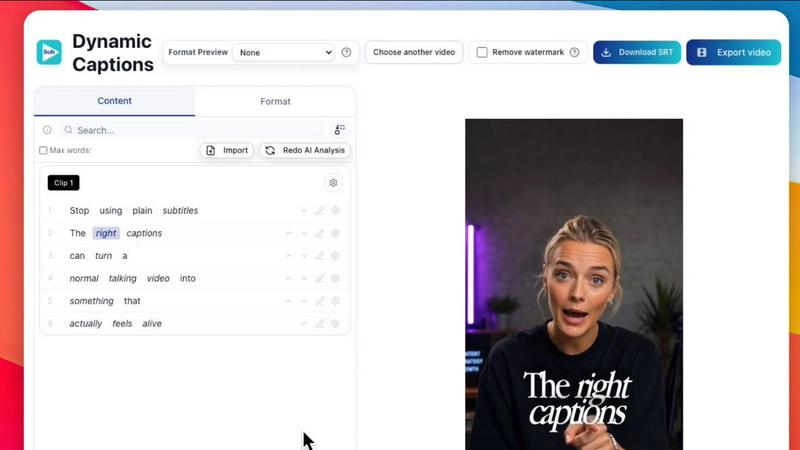
Subclip removes all limits on captioning. You can generate unlimited subtitles and export unlimited video minutes with local transcription in 48+ languages. The system is incredibly fast, offering "Transcript Ready" status almost instantly. You can customize the text, formatting, and styling of your captions to match your brand before publishing. This feature is critical for accessibility, viewer retention (many people watch without sound), and boosting engagement on social media platforms where captions are a standard requirement.
Use Cases of Subclip
For Creators & Podcasters
Long-form content is your bread and butter, but short-form clips drive growth. Subclip enables you to 10x your viewership with zero extra effort. Use the AI Clipping feature to automatically pull out the most engaging moments from your podcast or vlog. Then, use Text-Based Editing to refine those clips, add stunning auto-captions, and even dub them into multiple languages. This workflow allows you to feed multiple social media channels with high-quality, platform-optimized content from a single recording session.
For Coaches & Course Creators
Your recorded courses and coaching sessions are valuable assets. Subclip helps you maximize their reach. You can easily dub your entire course library into 20+ languages using your own cloned voice, making your expertise accessible to a global audience. Furthermore, you can use the AI to enhance your audio, removing background noise and room echo to ensure professional sound quality. The text-based editing also makes it simple to update or correct mistakes in a course module without having to re-record the entire video.
For Vloggers
Vloggers need speed and simplicity. Subclip delivers. You can upload your raw footage, and in one click, add stunning captions, insert B-Roll, layer audio, remove background noise, and export the final video. The platform supports all major aspect ratios (16:9, 9:16, 1:1) for different platforms. The built-in scheduling feature for YouTube and X (Twitter) further streamlines your workflow, allowing you to go from filming to publishing in a fraction of the time it would take with traditional software.
For Agencies & Freelancers
Output is everything. Subclip allows agencies and freelancers to dramatically increase their production capacity at a fraction of the cost. With unlimited transcription, export, and team collaboration, you can manage multiple client projects from a single workspace. Share projects with your team like a Google Doc for feedback and approvals. The ability to export directly to professional editors like DaVinci Resolve and Premiere Pro ensures that Subclip fits seamlessly into your existing post-production pipeline, handling the heavy lifting of the rough cut and captioning.
Frequently Asked Questions
How does the text-based video editing work?
You upload your video, and Subclip automatically generates a transcript. This transcript becomes your editing interface. You can highlight and delete text to remove the corresponding video segment, cut and paste text to rearrange your video, or type new text to insert a title card. The timeline is updated instantly, allowing you to make a rough cut in minutes without ever touching a traditional timeline.
Can I really dub my video into other languages with my own voice?
Yes. Subclip's AI dubbing feature uses a process called voice cloning. It analyzes your voice from the original video to understand your tone, pitch, and cadence. When you translate the video into another language, the AI generates a voiceover that speaks the new language but sounds like you. This preserves the emotional connection with your audience, making the translated video feel personal and authentic.
What file formats and editors do you support for export?
Subclip supports a wide range of export options. You can export your final video in standard formats suitable for social media and web use. For advanced editing, you can export the timeline as a .fcpxml file, which is compatible with DaVinci Resolve, Final Cut Pro, and Adobe Premiere Pro. This allows you to do your rough cut and captioning in Subclip, then hand off the project for final color grading or complex effects in your preferred NLE.
Is Subclip free to use?
Subclip operates on a freemium model. There is a free tier that allows you to try the core features, including transcription and video editing, with some limitations on usage. For users who need unlimited transcription, export minutes, access to all languages for dubbing, and team collaboration features, there are affordable paid plans available. The free tier is a great way to experience the speed and simplicity of the platform before committing to a subscription.
Pricing of Subclip
Subclip offers a freemium pricing model. A free tier is available that provides access to core features like text-based editing and transcription with certain usage limits. For users requiring unlimited transcription, export minutes, advanced AI features like voice cloning and multi-language dubbing, and team collaboration tools, Subclip offers several affordable paid plans. Specific pricing details for the paid tiers are available on the Subclip website.
Similar to Subclip


Oravaa
Oravaa deploys human-like Voice AI that autonomously qualifies leads, books appointments, and resolves support tickets across 30+ languages 24/7.

Hush Touch | Voice-to-Text for MacOS
Hush Touch is offline, on-device AI dictation for Mac that learns your voice for just $20.

Glossa
Glossa instantly translates sermons into 100+ languages live, breaking language barriers with AI.

Bantr: Offline & Unlimited TTS for Mac
Bantr is a powerful offline TTS app for Mac that delivers unlimited, private voiceovers without subscriptions or data.

KaiCalls
KaiCalls is your 24/7 AI voice agent that instantly answers calls, qualifies leads, and books appointments.

Vowen
Vowen transforms your voice into text and actions seamlessly across all apps, making your work faster and more.

Bargou One
Bargou One is your ultimate AI suite for seamless chat, creative content, and effortless translation.